- TheVowelsOfX's Newsletter
- Posts
- 🚀 Build & Deploy a Lightweight LLM API with FastAPI, Docker & Kubernetes
🚀 Build & Deploy a Lightweight LLM API with FastAPI, Docker & Kubernetes

TheVowelsOfX
July 05, 2025
In this blog, you’ll learn how to deploy a fast and efficient text generation API using FastAPI and Hugging Face Transformers. We’ll containerize the app with Docker, deploy it to Kubernetes (EKS-ready), and explore practical AWS strategies for running large language model (LLM) workloads — whether you're building for prototyping, production inference, or experimentation.
🔧 What You’ll Build
✅ A FastAPI server with a /generate endpoint
✅ Powered by Hugging Face’s distilgpt2 for fast, CPU-friendly inference
✅ Runs inside a lightweight Docker container
✅ Fully compatible with Kubernetes (EKS-ready)
✅ Includes optional GPU support for inference at scale
🧠 App Code – main.py
from fastapi import FastAPI
from pydantic import BaseModel
from transformers import pipeline
app = FastAPI()
generator = pipeline("text-generation", model="distilgpt2")
class PromptRequest(BaseModel):
    prompt: str
@app.post("/generate")
def generate(request: PromptRequest):
    result = generator(request.prompt, max_length=50, do_sample=True)
    return {"result": result[0]['generated_text']}
📦 Dockerfile
FROM python:3.10-slim
ENV DEBIAN_FRONTEND=noninteractive
RUN apt-get update && apt-get install -y \
    build-essential \
    git \
    && rm -rf /var/lib/apt/lists/*
RUN pip install --upgrade pip && \
    pip install numpy==1.26.4 torch==2.2.2 transformers==4.41.2 fastapi uvicorn accelerate
RUN python -c "import numpy; print('NumPy version:', numpy.__version__)" && \
    python -c "import torch; print('Torch version:', torch.__version__)"
WORKDIR /app
COPY main.py .
CMD ["uvicorn", "main:app", "--host", "0.0.0.0", "--port", "8080"]
🧪 Test Locally with Curl
docker build -t fastapi-llm .docker run -p 8080:8080 fastapi-llmcurl -X POST http://localhost:8080/generate \
-H "Content-Type: application/json" \
-d '{"prompt": "DevOps plays an"}'✅ Example Output:
{
  "result": "DevOps plays an important role in the delivery of the system..."
}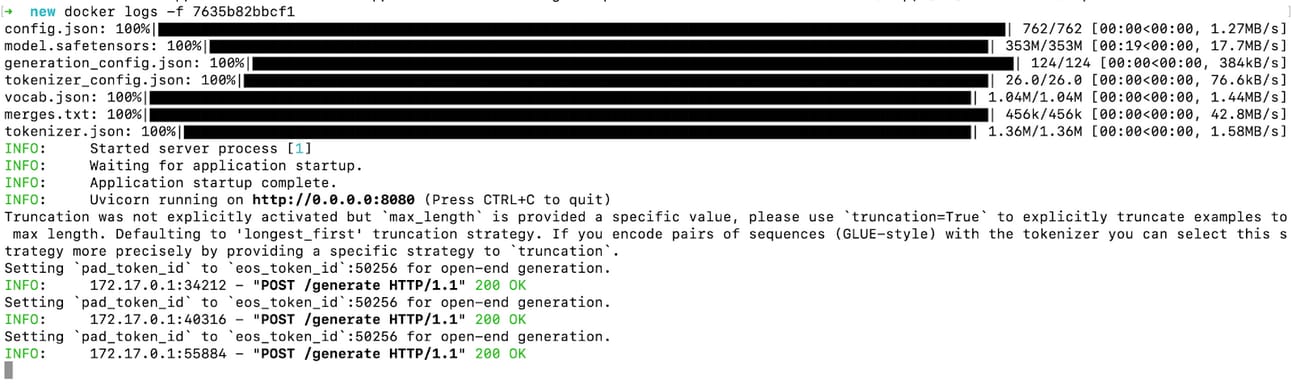
Docker Container Logs

Curl Output
☸️ Kubernetes + EKS Deployment
If you're deploying to AWS EKS or another Kubernetes cluster, here are the manifests:
k8s/deployment.yaml
apiVersion: apps/v1
kind: Deployment
metadata:
  name: llm-api
spec:
  replicas: 1
  selector:
    matchLabels:
      app: llm-api
  template:
    metadata:
      labels:
        app: llm-api
    spec:
      containers:
        - name: llm-container
          image: <your-ecr-repo>/llm-api:latest
          ports:
            - containerPort: 8080
          resources:
            limits:
              nvidia.com/gpu: 1
          volumeMounts:
            - mountPath: /dev/shm
              name: dshm
      volumes:
        - name: dshm
          emptyDir:
            medium: Memory
      nodeSelector:
        eks.amazonaws.com/accelerator: "nvidia"
k8s/service.yaml
apiVersion: v1
kind: Service
metadata:
  name: llm-service
spec:
  type: LoadBalancer
  selector:
    app: llm-api
  ports:
    - port: 80
      targetPort: 8080
NGINX Ingress Controller
helm repo add ingress-nginx https://kubernetes.github.io/ingress-nginx helm repo update

helm install ingress-nginx ingress-nginx/ingress-nginx \ --namespace ingress-nginx --create-namespace
Install cert-manager
kubectl apply -f https://github.com/cert-manager/cert-manager/releases/download/v1.12.0/cert-manager.crds.yaml
helm repo add jetstack https://charts.jetstack.io
helm repo update
helm install cert-manager jetstack/cert-manager --namespace cert-manager --create-namespace
Let’s Encrypt with ClusterIssuer
apiVersion: cert-manager.io/v1
kind: ClusterIssuer
metadata:
  name: letsencrypt-prod
spec:
  acme:
    email: "[email protected]"
    server: "https://acme-v02.api.letsencrypt.org/directory"
    privateKeySecretRef:
      name: letsencrypt-prod-private-key
    solvers:
    - http01:
        ingress:
          class: nginx
k8s/ingress.yaml
# k8s/ingress.yaml
apiVersion: networking.k8s.io/v1
kind: Ingress
metadata:
  name: llm-ingress
  annotations:
    nginx.ingress.kubernetes.io/rewrite-target: /$1
    kubernetes.io/ingress.class: "nginx"
    nginx.ingress.kubernetes.io/ssl-redirect: "true"
    cert-manager.io/cluster-issuer: "letsencrypt-prod"
spec:
  ingressClassName: nginx
  rules:
    - host: llm.yourdomain.com  # Replace with your actual domain
      http:
        paths:
          - path: /?(.*)
            pathType: Prefix
            backend:
              service:
                name: llm-service
                port:
                  number: 80
✅ Don’t forget to apply the NVIDIA GPU device plugin:
kubectl apply -f https://raw.githubusercontent.com/NVIDIA/k8s-device-plugin/v0.13.0/nvidia-device-plugin.yml
🔧 Practical AWS Guide: Strategic LLM Deployment
When you're ready to move beyond local and test ideas at scale, here’s a playbook:
🧠 1. Define the Use Case First
Ask:
Is it training, fine-tuning, or inference?
Real-time (chatbots) vs batch (e.g. document summarization)?
Open models (Hugging Face)? Proprietary (OpenAI)? Or hybrid?
🧱 2. AWS Options for LLM Workloads
Option | Best For | Notes |
Amazon SageMaker | Managed training + inference | Includes Hugging Face DLCs and autoscaling |
SageMaker Serverless | Bursty inference, zero infra mgmt | Pay-per-inference |
Amazon Bedrock | No infra, plug-and-play LLMs | Use Claude, LLaMA, Mistral, etc. |
EC2 + DLAMI | Full control (GPU-enabled) | Best for power users |
EKS/ECS + Inferentia2 | Cost-efficient long-term inference | Use Trainium for training |
🛠️ 3. GPU Recommendations
Use Case | Instance Type |
Small LLM inference | g5.xlarge, g5.2xlarge |
Fine-tuning or batching | p4d, p5 |
Cost-efficient inference | inf2.xlarge |
Distributed training | ml.p4d.24xlarge |
💰 4. Cost & Scale Strategy
Use Spot Instances for training (save up to 90%)
Autoscale inference endpoints with SageMaker
Share training datasets using EFS
Use lifecycle policies or scheduled shutdowns
🔐 5. Security Best Practices
Use VPC-only endpoints (for Bedrock/SageMaker)
Apply IAM least privilege
Encrypt at rest & in transit with KMS
Use Amazon Macie to scan sensitive training data
📦 6. AI Integrations & Tools
LangChain or Haystack for RAG pipelines
Pinecone or OpenSearch for vector search
Step Functions for orchestration
🧪 7. Experimentation Strategy
Use SageMaker Studio Lab for quick tests
Try Hugging Face on SageMaker JumpStart
Monitor deployments via Model Monitor
📍 Sample Reference Architecture
Client App (Chat UI/API)
         ↓
     API Gateway
         ↓
     Lambda (Auth, Routing)
         ↓
  SageMaker Endpoint (LLM)
         ↓
Optional: Vector DB (RAG)
         ↓
     Amazon S3 (Docs, Embeds)
💡 Bonus: Fast POCs for Clients
Amazon Bedrock: instant LLMs, no infra
text-generation-webuiong5.xlargefor open-sourceHugging Face + SageMaker JumpStart: 3-click deploy
📬 Final Thoughts
When it comes to LLM deployment, the model is only half the battle — the real challenge often lies in everything around it: getting the environment right, ensuring portability, and designing for scale.
With this approach, you get the best of all worlds:
✅ Local development is a breeze with Docker — no heavy dependencies, no surprises.
✅ Kubernetes-ready deployments (EKS or any cloud) give you flexibility to scale when needed.
✅ AWS-native options ensure you can optimize for performance, cost, and compliance — whether you're prototyping or running production inference at scale.
This setup is designed to grow with you — from solo testing on your laptop to handling enterprise-level requests across multiple regions.
✨ Try it out, extend it, break it, rebuild it. And if you're working on something similar — or planning to — I'd love to hear about it and help shape it further.
Let’s simplify LLM deployment together. 🚀
Reply